-
Type:
Bug
-
Resolution: Unresolved
-
Priority:
 Low
Low
-
Component/s: Trigger - Manual from Issue
-
Severity 3 - Minor
-
Jira Service Management
Issue Summary
An Automation rule consisting of a Manual trigger and a Log action doesn't seem to respect the user that is defined as Rule actor (usually the built-in Automation for Jira user) in the context of printing information about Approver Groups via Smart Values.
Steps to Reproduce
- In the context of a service project make sure that you have a Workflow with an Approval step configured. The Approval step should point to a Group Picker Jira Field, as it should have an Approval group and not a Single User Picker Field.
- Create the following Automation rule that is using a Manual trigger and a Log action.
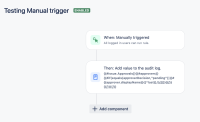 The log action should consist of the following smart value:
{{#issue.Approvals}}{{#approvers}}{{#if(equals(approverDecision,"pending"))}}# {{approver.displayName}}{{^last}},\\{{/}}{{/}}{{/}}{{/}}

- Create a work item related to the Workflow defined above and make sure to transition the issue until the Approval status where the Approvers group is defined.
- Manually run the automation (meaning that the user is not either a Project Administrator or has the system Jira Administrator permissions granted, could e.g. be a normal Service Agent user).
Expected Results
The Rule actor is honored and the permissions granted to the Automation for Jira user should be honored. Once the automation verifies that the user who manually triggered the rule has the permissions to trigger the rule, the automation should not take into consideration the permissions of the user who triggered the rule, but only the Rule actor.
So in the context of the automation shared above independent if an admin or non-admin users Manually triggers the rule the Log action should always print the relevant data about the Approvers.
Actual Results
When a non-admin user runs the rule the Log action doesn't return anything.
When an admin user runs the rule the Log action does return data.
Meaning that the automation seems to take into account the permissions of the user.
Other actions like e.g. add comment can be affected by this inconsistency as well.
Workaround
Add a Re-fetch issue data action and the correct Rule actor should be used.
