-
Type:
Bug
-
Resolution: Fixed
-
Priority:
 High
High
-
Component/s: Action - Clone Issue
-
Severity 2 - Major
-
Jira Service Management
Issue Summary
While editing Clone Issue or Create Issue action of your Automation Rule, adding a field from the drop down menu will clear the values set for other fields.
Refer to the attached screen recording where the field reset is captured and the HAR file (atl-grao-tst.atlassian.net.har) captured for the operation. HAR file shows a batch update being performed when a new field is added or removed from the dropdown.
 Tested on Cloud only.
Steps to Reproduce
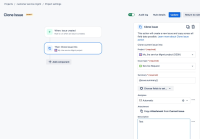
- Ensure that you have an automation rule which clones tickets using the Clone Issue action. Go to Clone Issue action under your automation rule
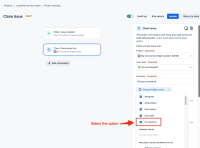
- Add an additional field to be selected from the drop down.
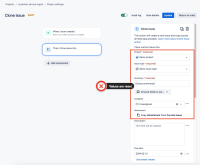
- On selection of the field, all the existing fields are cleared


Expected Results
Only the newly added field should not contain default value or no value. All the other fields which were set earlier should be intact.
Actual Results
All the fields are reset to default values.
Workaround
- Although adding a field from the drop down menu clears the values already set, you can re-add the values manually.
OR - Use the Advanced field editing in Automation Rule to set the values, which doesn't seem to be impacted.


