-
Type:
Suggestion
-
Resolution: Unresolved
-
Component/s: Home Page
-
None
Issue Summary
When you visit start.atlassian.com, it remembers the last Atlassian "Home" page you accessed.
Steps to Reproduce
- Go to start.atlassian.com
- From the app switcher, click on Atlassian Home for a different site.
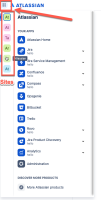
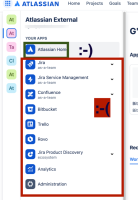
- Navigate to a Jira/Confluence instance of your choice
- Go to start.atlassian.com again
- Observe that the Home page is not for the last visited site/org.


Expected Results
start.atlassian.com should redirect users to their main instances as default.
Actual Results
Instead, they are being redirected to the last instances they accessed.
Workaround
To avoid the issue, choose the "Atlas" product from the products list in the Switcher instead of "Atlassian Start."
Or start by going to the correct home URL (which you can access through the app switcher in the top left corner of the navigation bar) and then navigate to start.atlassian.com. For now, we recommend that users go directly to home.atlassian.com and use the app switcher to access the correct start page if necessary.

