-
Type:
Bug
-
Resolution: Fixed
-
Priority:
 Medium
-
Affects Version/s: 9.12.10, 9.12.11, 9.12.13, 9.12.14, 9.12.15, 9.12.16, 9.17.0
-
Component/s: (Advanced Roadmaps) Plan - Roadmap
-
9.12
-
9
-
Severity 3 - Minor
-
10
Issue Summary
The label-type custom fields are supported for usage with Advanced Roadmaps plans. When being added to a plan, such fields could be used for filtering purposes. However, unlike the regular system Label field, it will not show all expected label values (the number of shown values is limited to 20), and an attempt to find the required value doesn’t work either.

Steps to Reproduce
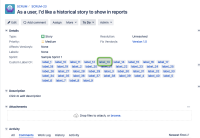
- Created a label-type custom field and generate 20+ unique values for this field across the issue
- Add this custom field to your Advanced Roadmaps plan
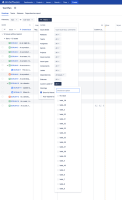
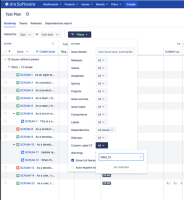
- On the timeline view, try to add an additional filter based on the value of your custom field.


Expected Results
Advanced Roadmaps should allow to use of any existing value of this label custom field for filtering
Actual Results
Instead, only 20 values will be listed as options available for selection and you will not be able to search for additional values.
Workaround
Currently, there is no known workaround for this behaviour. A workaround will be added here when available


