-
Type:
Bug
-
Resolution: Obsolete
-
Priority:
 Low
Low
-
Component/s: Navigation - Top
-
None
-
2
-
Severity 3 - Minor
Summary
There's no field for adding feedback description/details when choose "Give Feedback" in JIRA old interface in Mozilla Firefox
Steps to Reproduce
- Using Mozilla Firefox browser, in JIRA old UI click on "Give Feedback" icon next to "Help" icon
- A popup window (Help us improve JIRA) will appear where there are fields for Name and Email address, but there is no field for feedback description/details
- Fill the fields for Name and Email, and click "Submit"
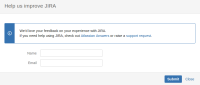

Expected Results
- A page/window with a field to enter feedback
Actual Results
- There is no field for feedback, and clicking on submit gives the following error message:
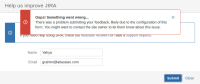

Workaround
- Change to JIRA new user interface (Experience new JIRA)
- Choose different browser (i.e. Google Chrome)

