-
Type:
Bug
-
Resolution: Timed out
-
Priority:
 Medium
-
None
-
Affects Version/s: 4.2
-
Component/s: Page - Export / Import
-
Environment:
Confluence 4.1.6 & Confluence 4.2 Standalone, JDK_1.6.0_21, Windows 7
-
2
-
Severity 2 - Major
Here are the following steps on how to reproduce this bug report:
Confluence 4.1.x:
- Go to any space and create a page
- Click on 'Tools -> Export to Word'
- Save the Word doc file
- Open it with a text editor
- This is the result:
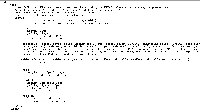

Confluence 4.2.x:
- Go to any space and create a page
- Click on 'Tools -> Export to Word'
- Save the Word doc file
- Open it with a text editor or with a web browser as a HTML file
- This is how it will look like (notice the additional email header lookalike, it's also there at the bottom but not in this screen shot):



- relates to
-
CONFSERVER-26113 Export Page to Word should support Office, Open Office and Google Docs
- Future Consideration