-
Type:
Bug
-
Resolution: Cannot Reproduce
-
Priority:
 Low
Low
-
Component/s: Page - Editor - Cloud, Page - Editor - Legacy (TinyMCE)
-
1
-
Severity 3 - Minor
-
0
Issue Summary
Pages with indented Action Items (tasks) fail to convert to the new editor
Steps to Reproduce
- Create a page (or template) using the old editor;
- Insert an Action Item and some text;
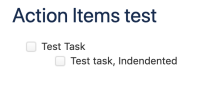
- Hit Enter and another tasks will be created; This time indent this action item by hitting TAB on your keyboard;
- Save the page and go back into edit mode;
- A message on the bottom on the page will be displayed, to convert this page to the new editor;
- Click to Preview page in the new editor



Expected Results
- Page to be correctly converted to the new editor;
Actual Results
- Page fails to be converted due to indentation on action items


Workaround
- Removing the indentation from these items solves this conversion issue;


