-
Type:
Suggestion
-
Resolution: Fixed
-
Component/s: Editor - Page / Comment Editor
-
Environment:System Information
System Date Tuesday, 01 Apr 2008
System Time 14:40:17
System Favourite Colour Claret
Java Version 1.5.0_11
Java Vendor Sun Microsystems Inc.
JVM Version 1.0
JVM Vendor Sun Microsystems Inc.
JVM Implementation Version 1.5.0_11-b03
Java Runtime Java(TM) 2 Runtime Environment, Standard Edition
Java VM Java HotSpot(TM) Server VM
User Name tomcat4
User Timezone Israel
Operating System Linux 2.4.21-27.0.2.EL
OS Architecture i386
Filesystem Encoding UTF-8
Java VM Memory Statistics
Total Memory 1199 MB
Free Memory 992 MB
Used Memory 207 MB
Memory Graph
[Used Memory (17 %)] [Free Memory (83 %)]
83 % Free
Runtime Information
Database Dialect com.atlassian.hibernate.dialect.MySQLDialect
Database Connection URL jdbc:mysql://localhost/confluence?autoReconnect=true
Database Driver Name com.mysql.jdbc.Driver
Database Driver Version 3.0
Application Server Apache Tomcat/5.0
Servlet Version 2.4
Confluence Home /var/lib/tomcat5/webapps/Wiki/wiki-old
Uptime 3 days, 22 hours, 21 minutes, 35 seconds
Confluence Version 2.3.1
Build Number 643System Information System Date Tuesday, 01 Apr 2008 System Time 14:40:17 System Favourite Colour Claret Java Version 1.5.0_11 Java Vendor Sun Microsystems Inc. JVM Version 1.0 JVM Vendor Sun Microsystems Inc. JVM Implementation Version 1.5.0_11-b03 Java Runtime Java(TM) 2 Runtime Environment, Standard Edition Java VM Java HotSpot(TM) Server VM User Name tomcat4 User Timezone Israel Operating System Linux 2.4.21-27.0.2.EL OS Architecture i386 Filesystem Encoding UTF-8 Java VM Memory Statistics Total Memory 1199 MB Free Memory 992 MB Used Memory 207 MB Memory Graph [Used Memory (17 %)] [Free Memory (83 %)] 83 % Free Runtime Information Database Dialect com.atlassian.hibernate.dialect.MySQLDialect Database Connection URL jdbc: mysql://localhost/confluence?autoReconnect=true Database Driver Name com.mysql.jdbc.Driver Database Driver Version 3.0 Application Server Apache Tomcat/5.0 Servlet Version 2.4 Confluence Home /var/lib/tomcat5/webapps/Wiki/wiki-old Uptime 3 days, 22 hours, 21 minutes, 35 seconds Confluence Version 2.3.1 Build Number 643
-
177
-
70
NOTE: This suggestion is for Confluence Server. Using Confluence Cloud? See the corresponding suggestion.
Hi everyone,
We're happy to share that we're working on support for languages and special characters in page URLs.
Users will soon be able to access pages and blog posts using a more intuitive URL that includes the space key, pageId and page title. This new URL format also supports page titles that contain non-latin or special characters. Even better, references to URLs in the previous format like bookmarks won't break, but will automatically redirect the user to the new URL.
New URL format example:
https://confluence.example.com/spaces/SPACEKEY/pages/pageId/Page+Title
This change will be released soon. Please look out for it in the Confluence Release Notes, and continue to watch this ticket for further updates.
Kind regards,
Jacqueline Bietz
Product Manager
Confluence Data Center
Hi,
When including different characters in page names - like %, &, +, etc., the URL is generated differently.
A usual URL (including the page name) looks like this: http://www.gigaspaces.com/wiki/display/GS6/Welcome+to+GigaSpaces
BUT if you add a character in the page name (for example, naming a page, C++), the URL would look like this: http://www.gigaspaces.com/wiki/pages/viewpage.action?pageId=36864161
which is less nice-looking to say the least, and also then all URLs in the wiki aren't standard.
Is it possible to change this?
If it's been fixed in a future version, I'll be glad to know.
Thanks,
Limor
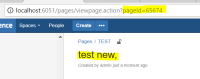
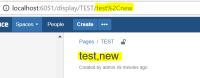
Suggestion to avoid displaying the page ID in URL (Tested and verified in Confluence 6.5.1)
- Avoid using these special characters + % ? / \ & ; in any page title/name
- Avoid ending a page title/name with any special characters.
- Example of ending a page title/name with special characters:
- Example of ending a page title/name without special characters:
- Example of ending a page title/name with special characters:


- causes
-
CONFSERVER-56160 Unable to find attached video clip when using the *multimedia macro* on the page when the *Page Title Name* contains any special character (:)
-

- Gathering Impact
-
- is duplicated by
-
-

- Closed
-
-
-
- Closed
-
-
- Closed
-
- Closed
-
- Closed
- is related to
-
-
- Closed
-
-
-
- Closed
-
-
- Closed
- relates to
-
- Closed
-
PSR-438 Loading...
- mentioned in
-
-
-
-
-
-
-
-
-
-
-
-
-
-
-
-
-
-
-
-
-
-
-
-
-
-
-
-
-
-
-
-
-
-
-
-
-
-
-
-
-
-
-
-
