-
Type:
Bug
-
Resolution: Fixed
-
Priority:
 Low
Low
-
Affects Version/s: 9.3.0, 9.1.2, 8.2.8, 9.0.3, 8.1.12, 9.2.3, 9.0.4, 9.2.4
-
Component/s: Google App Engine, Infrastructure
-
None
-
1
-
Severity 3 - Minor
Issue Summary
This is reproducible on Data Center: 
robots.txt file not working in Bamboo after the upgrade.
The robots.txt protocol is used to tell search engines (Google, MSN, etc) which parts of a website should not be crawled.
Steps to Reproduce
- Add robots.txt file(in Bamboo version 9.0.2) with below content under <Bamboo-Install>/atlassian-bamboo folder
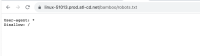
User-agent: *
Disallow: /
Refet this page Prevent Bamboo from being indexed by search engines
- Access the page URL <Bamboo-BASE-URL>/robots.txt, it will show content like:
- Upgrade the Bamboo to Bamboo 9.2.4
- Add the same robots.txt file under <Bamboo-Install>/atlassian-bamboo folder.
- Access the <Bamboo-BASE-URL>/robots.txt

Expected Results
robots.txt should be working and should be accessible.
Actual Results
robots.txt file throws page not found error like below:

Workaround
Check the notes section from the following KB article:


- mentioned in
-
Page Loading...