-
Type:
Bug
-
Resolution: Incorrectly Filed
-
Priority:
 Low
Low
-
Component/s: None
-
None
Step to reproduce:
- Create a user with no application access or convert customer to Atlassian Account
- Go to the service desk customer portal: https://<instance>/servicedesk/
- Click on avatar > Profile
- Click on the Atlassian Account link:
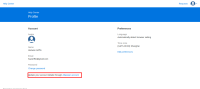

Expected Behaviour
Redirect to https://id.atlassian.com
Actual Behaviour
Redirect back to home: https://<instance>/servicedesk/customer/portals
Workaround
Directly go to https://id.atlassian.com
Notes
This doesn't affect users with application access.

- relates to
-
-
- Closed
-